Booking System for a Tourism Business in Eilat: Platform, Off the Shelf Software, or a System Built for the Business
A tourism business in Eilat has three main ways to take bookings. It can use an external platform, choose off the shelf software, or build a system around the way the business works. There is no single answer for everyone. We built systems for a water sports beach, a park and vacation villa management. In each business the booking started a different process. This guide helps you work out what you actually need before choosing a tool.
Why bookings are a different problem for a tourism business in Eilat
A booking at a water sports beach is nothing like a haircut appointment. There is a round that leaves at a set time with a fixed number of seats. There is weather that can cancel the whole day. Some customers booked in advance and some just walked up to the desk and want the next round. And there is a season when the desk never stops answering the phone, and months with almost no traffic. We collected the seasonality numbers on the Eilat tourism numbers page, and what to do with it in the article on when to advertise a business in Eilat.
Our work exposed three different processes. A water sports beach needs to combine advance bookings with customers arriving at the desk. A park needs to connect a booking with attraction status and the field team. A villa manager needs to bring direct bookings and external accommodation channels into one calendar. The conclusion is not that every business needs custom software. The process should be mapped before the tool is chosen.
Three ways to take bookings and what each one gives you
The difference between the three is not just money. It is who holds the customer and who decides how the business works.
An external platform connects the business with an audience already searching there. Payment terms, access to customer details and cancellation rules vary by platform, so the current agreement matters more than a number quoted in an article. Off the shelf software comes with a relatively fixed process and can be an excellent choice when the business fits it. A custom system starts with the existing workflow. It requires more decisions up front and is justified only when the gap between the business and ready made tools genuinely creates errors, duplicate work or wasted time.
| What you compare | External platform | Off the shelf software | System built for the business |
|---|---|---|---|
| How you pay | According to the platform's current agreement | According to the plan and usage | Scoping and development plus ongoing maintenance |
| Who holds the data | Check the agreement to see which details the business receives | Check export and access before choosing | Ownership, export and permissions are defined in advance |
| Seasonal flexibility | According to the platform's options | According to the settings already in the product | Built around the business rules and changed with them |
| Weather cancellations | According to the platform policy | Check whether group cancellation exists | A full round and its messages can be planned into the workflow |
| Desk and online together | Check the connection the platform provides | Depends on the product and its integrations | Advance and walk in bookings can share one screen |
| Languages | According to the platform support | According to the product support | Chosen around the actual audiences of the business |
| Connection to Google and ads | Depends on the links and tracking the platform permits | Depends on the product integrations | Booking events and acquisition sources can be part of the system |
| Who it fits | A new business that wants traffic now and is willing to pay for it | A business with a standard process | A business with a process of its own that wants to hold the customer |
What we learned from a water sports beach: rounds, the desk and the weather
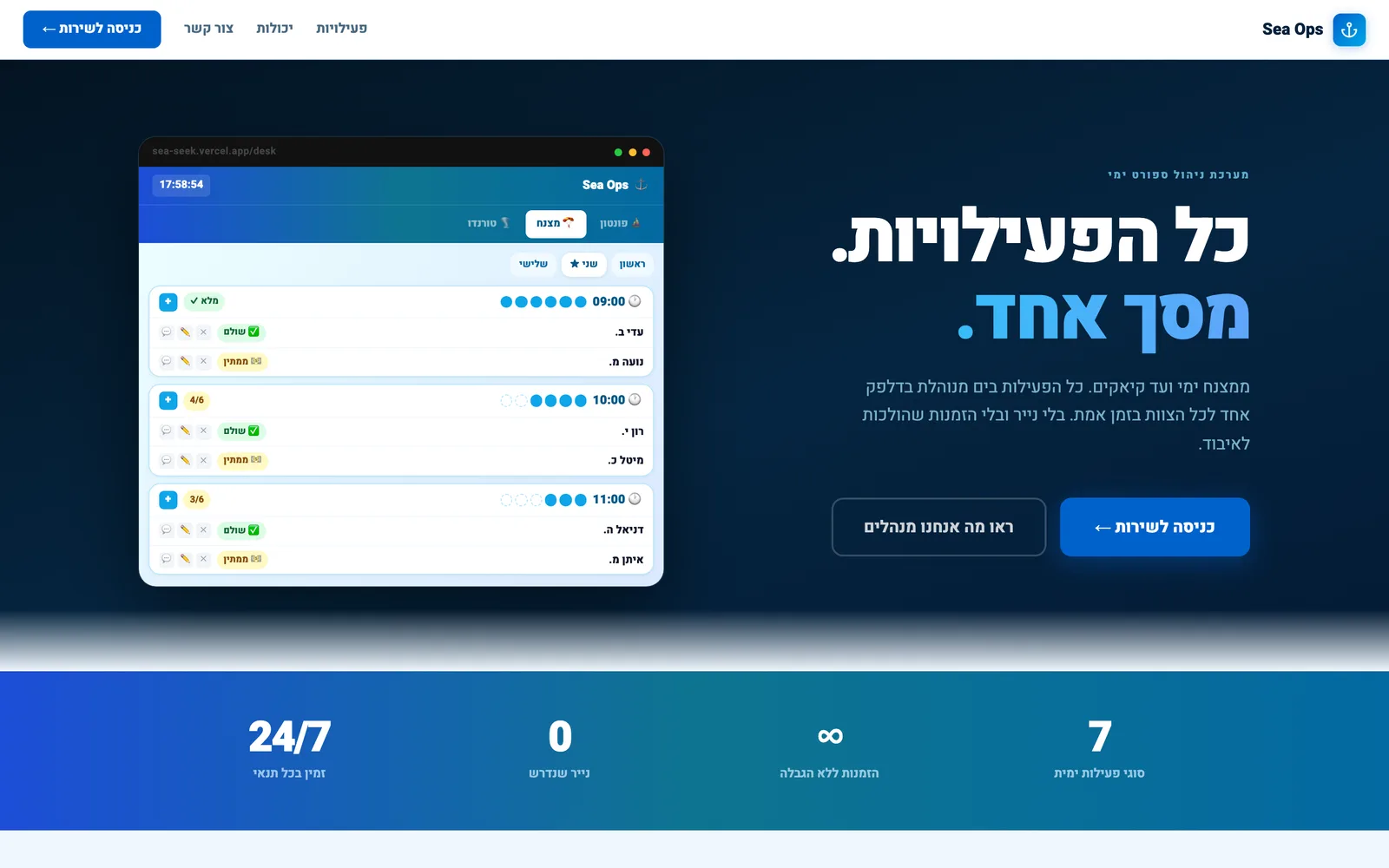
The first thing a water sports beach needs is rounds. Every activity has its own time and capacity. The system needs to show the desk how many places remain and let the team open a booking while the customer is standing there. Advance bookings and walk in customers need to appear on the same list. Otherwise the team works from two different pictures of the same activity.
The second thing is the guides out on the water. They need to see from their phone the same picture the desk sees. Who is getting on the next boat and who already paid. No paper running between the desk and the beach. The third thing is weather. A strong wind closes the sea for hours. In the system we built you cancel a whole round in one click and everyone booked on it gets a message. Then you offer them another round or a refund. Without that, the desk spends the morning on the phone.
The fourth thing is the seasonal team. A new worker needs to understand their screen quickly without receiving access to the whole business. The desk sees bookings. A guide sees the relevant round. Management sees a wider picture. Those permissions are not technical decoration. They are part of keeping the work clear under pressure.
What we learned from a park: attractions, inspections and a team in the field
A family park is a different story. There the problem is not just the booking but the operations around it. Every attraction has periodic inspections that must happen. There are faults that come up in the middle of the day. And there is a team out in the field next to the attraction, not in front of a computer.
The system we built for the park gives every attraction a card with its history. Periodic inspections come up on the calendar on their own and whoever is responsible gets a reminder. A worker who spots a fault photographs it from their phone and it goes onto the board by urgency. The manager sees what was fixed, what is waiting and what keeps coming back. It sounds far from bookings but it is the same principle. The system adapts itself to how the team actually works. From the phone in the field, not from an office.
What we learned from villa management: bookings arriving from several places at once
Vacation villa management is the most complex case we have met. One villa is listed on several channels at the same time. The big booking site. The home stay site. And the business's own site. Every channel brings bookings, and if they do not talk to each other the same night gets sold twice. That is every property manager's nightmare.
In the villa management system we built, the calendar synchronises with Booking.com and Airbnb alongside direct bookings. From there a booking can start the rest of the work. A guest message, a contract signed on the phone, a payment link and cleaning or preparation tasks for the team. This is more complex than a booking screen because every date change affects the guest, availability and the work in the field.
The lesson from this case matters for every tourism business. The more booking channels you have, the higher the chance of a manual mistake. The answer is not to give up channels but to connect them to one place that is the single source of truth.
What every booking system for a business in Eilat must have

After three different systems there is a list that repeats in all of them. These are the things without which the system will not last a season.
- Real time availability. Whoever books on the site and whoever stands at the desk see the same open seats at the same second
- Hebrew and English from day one. A tourist books in English, the desk works in Hebrew, and both see the same booking
- Phone first. The desk, the guide and the manager work from their phones, not from a computer. The screen has to be fast and clear on a small display
- A clear confirmation. It can go through WhatsApp or another channel that suits the business and the system should record that it was sent
- Group cancellation. The option to cancel a round or a whole day and notify everyone in one click. Eilat weather does not ask
- Simple roles. A seasonal worker learns their screen on day one and does not see what is not theirs
- A deposit or advance payment when it fits the business policy. The terms need to be clear before confirmation
- The customer stays with the business. The details live in the business's system and can be exported. Not locked up with anyone
- Connection to the Google Business Profile and to ads. A booking button right from the map, and tracking how many bookings each campaign brought
How to connect the system to Google and to ads
A booking system standing alone does only part of the job. It needs to connect with the places where customers meet the business. According to Google Help, eligible Business Profiles can include links for actions such as booking or making a reservation. That link can lead to the business booking page. The profile itself is covered in our guide to the Google Business Profile for a business in Eilat.
The second thing is conversion tracking. When you run a Google campaign you need to know how many bookings came from it and what each one cost. The system sends Google a signal on every completed booking, and then you see in the ads account what actually worked. Without that you manage a budget by gut feeling. We explained how to build the campaign itself in the article on Google Ads for a business in Eilat.
When you do not need a custom system
Let us say this honestly because it is true. A business with a simple process does not need to build a system. A restaurant that wants table reservations. A hair salon that wants an appointment book. There, off the shelf software does the job well, fast and cheap. A new business that does not yet know how it works is also better off starting with a platform or existing software, and learning what it is missing before it invests.
A custom system is right when there is a process no tool understands. Rounds with seats. Booking channels that need to sync. A team in the field working from phones. Or simply a business that has grown and feels it is working for the software instead of the software working for it. Then you sit down for scoping and start with a prototype. A first live version you can click through within weeks, and then decide whether to continue. How that works with us is on the app and system development page.
This is exactly what we do at App and System Development. If you want us to go over it together for your business, write to us.
Frequently asked questions
The cost depends on the number of processes and integrations, not only on the number of screens. Before a quote, you need to map who books, who confirms, what happens after a cancellation and which systems must update. A business with a standard process may get better value from off the shelf software.
You do not have to choose. Many businesses stay on a platform for the traffic it brings and hold a system of their own for the customers who come directly. What matters is that there is one calendar, and that a booking from the platform closes the spot with you too.
In the system we built for the beach you cancel a whole round in one click and everyone booked on it gets an automatic message. Then you offer them another round or a refund. Without that, the desk spends the morning on the phone instead of taking care of the customers who did show up.
Usually a website that works well on the phone and installs on the home screen like an app is enough. The team opens it from their phones and the customer books from it. A real app in the store makes sense when you need notifications or work without reception, and that is rare in a tourism business in Eilat.
Timing depends on the workflow and number of integrations. The safer approach is to split the work into stages and begin with the part that solves the central problem. The team uses a smaller version and gives feedback before it expands.
Only if you feel you are working for the software. If the team bends the work to fit the tool, or if there is a process the software simply cannot do. If it does the job, there is no reason to touch it.
Want us to look at this for your business?
Just write to us on WhatsApp. The first conversation comes with no commitment. 050-294-0127
Write to us on WhatsApp